

Backup & disaster recovery
The control-plane PostgreSQL database is the single source of truth — organizations, projects, providers, budgets, limits, guardrail config, API keys, usage ledger, and the audit log all live there. Protecting it is the core of your DR plan.
Who this is for
Platform engineers responsible for data protection and recovery.
What to back up
| Data | Layer | Why it matters |
|---|---|---|
| Tenant & policy config | Control-plane PostgreSQL → PITR | Recreates all orgs, projects, budgets, providers, guardrails |
| API keys | Control-plane PostgreSQL → PITR | Keys keep working after restore |
| Usage ledger | Control-plane PostgreSQL → PITR | Month-to-date spend and history |
| Audit log | Control-plane PostgreSQL → PITR | Compliance trail |
| Identity | Keycloak PostgreSQL → PITR | Users, brokered-IdP config, group mappings |
| Kubernetes resources & Secrets | Velero | Manifests + Secrets (provider keys, OIDC, TLS) across all namespaces |
Metrics, logs, and traces in the observability stack are operational telemetry — back them up only if your retention policy requires it. They can be reconstructed from live traffic; the config database cannot.
Redis is ephemeral. Quota counters and rate-limit state are not backed up — they reset to zero on cluster rebuild. This may allow a brief over-quota window after a restore until the ledger resynchronises. Design your DR plan around this.
How backups work
The platform ships self-hosted, two-layer backup with no external cloud dependency. One switch turns it on:
backup:
  enabled: true
That provisions, entirely inside your cluster:
- An in-cluster S3 store — SeaweedFS, the shared backup target. There is no external bucket or cloud credential to manage: the platform creates the buckets and wires the credentials internally (Vault → External Secrets).
- PostgreSQL point-in-time recovery — CloudNativePG's Barman Cloud Plugin takes base backups plus continuous WAL archiving for both the control-plane and Keycloak databases, to
s3://cnpg-backups/(each database sub-pathed by name). This is what makes PITR possible. - Kubernetes-resource backup — Velero captures manifests and Secrets across all namespaces to
s3://velero-backups/. The Postgres data volumes are excluded — those are owned by the PITR layer above; double-capturing a livePGDATAvolume is unsafe. Persistent-volume data is opt-in per volume. - A web console — Velero UI, single-sign-on and admin-gated, to browse, run, and restore backups (see below).
These components ship as part of the platform's GitOps deployment (delivered as ArgoCD applications), so enabling backup.enabled is all that's required — there is no object store to stand up or credentials to inject by hand.
Tuning
| Value | Default | What it does |
|---|---|---|
backup.enabled | false | Master switch (on in the production GitOps deployment) |
backup.cnpgSchedule | "0 0 */12 * * *" | CNPG base-backup cadence — a 6-field (seconds-first) cron; every 12h. WAL archives continuously between base backups. |
backup.seaweedfs.storage | 20Gi | Size of the object-store volume |
backup.cnpgBucket / backup.veleroBucket | cnpg-backups / velero-backups | Bucket names |
Confirm Postgres WAL archiving is healthy:
kubectl get cluster -n opsta-ai-gateway opsta-pg \
  -o jsonpath='{.status.conditions[*].message}'
# Expected: "Cluster is Ready  Continuous archiving is working"
Back up before every upgrade
Take a fresh base backup immediately before an upgrade so you can roll back a schema migration if needed. See Upgrades → Rollback.
Taking an on-demand backup
Trigger a base backup at any time with a Backup resource (the plugin method):
kubectl apply -f - <<'EOF'
apiVersion: postgresql.cnpg.io/v1
kind: Backup
metadata:
  name: opsta-pg-pre-upgrade
  namespace: opsta-ai-gateway
spec:
  cluster:
    name: opsta-pg
  method: plugin
  pluginConfiguration:
    name: barman-cloud.cloudnative-pg.io
EOF
Monitor progress:
kubectl get backup -n opsta-ai-gateway -wExpected output when complete:
NAME                   AGE   CLUSTER    METHOD   PHASE
opsta-pg-pre-upgrade   30s   opsta-pg   plugin   completed
Cluster-resource (Velero) backups can be triggered the same way, or with one click from the Velero UI.
Restoring from backup
Honesty note — this is restore-based DR
A restore recovers the databases and Kubernetes resources. Bringing the platform fully back up also requires your GitOps/IaC pipeline to reconcile the cluster. Total wall-clock RTO depends on your automation.
Restore PostgreSQL (point-in-time)
Recover into a new cluster that bootstraps from the object store — never point a fresh cluster at the live PGDATA:
apiVersion: postgresql.cnpg.io/v1
kind: Cluster
metadata:
  name: opsta-pg                  # match the original name so the platform reconnects
  namespace: opsta-ai-gateway
spec:
  instances: 1                    # scale up after a verified restore
  imageName: <your-registry>/cloudnative-pg/postgresql:<same-as-running-cluster>
  bootstrap:
    recovery:
      source: src
  externalClusters:
    - name: src
      plugin:
        name: barman-cloud.cloudnative-pg.io
        parameters:
          barmanObjectName: opsta-pg-store   # the ObjectStore the chart created
          serverName: opsta-pg               # original cluster name — its sub-path in the bucket
  storage:
    size: 5Gi
serverName is required
serverName must be the original cluster name (opsta-pg), or CNPG looks under the wrong sub-path and reports "no target backup found".
For point-in-time recovery (not the latest state), add spec.bootstrap.recovery.recoveryTarget with a timestamp or LSN. Apply the same procedure to Keycloak — ObjectStore keycloak-pg-store, serverName: keycloak-pg.
Wait for the restored cluster to come up:
kubectl wait --for=condition=Ready \
  cluster -n opsta-ai-gateway opsta-pg --timeout=600s
Then verify the data is intact:
kubectl exec -n opsta-ai-gateway opsta-pg-1 \
  -- psql -U postgres -d opsta -c "
SELECT (SELECT count(*) FROM organizations) AS orgs,
       (SELECT count(*) FROM projects)      AS projects,
       (SELECT count(*) FROM users)         AS users,
       (SELECT count(*) FROM providers)     AS providers,
       (SELECT count(*) FROM keys)          AS api_keys,
       (SELECT count(*) FROM audit_log)     AS audit_rows;"
Compare against your pre-loss record.
Restore Kubernetes resources
Cluster manifests and Secrets (provider keys, OIDC config, TLS) live in Velero — restore them from the Velero UI or the CLI:
kubectl -n velero get backups.velero.io          # FQ kind — a bare `backup` hits CloudNativePG's CRD
velero restore create --from-backup <backup-name>
Once the database and Secrets are back, your GitOps pipeline reconciles the rest. The control plane reconnects to the restored database and projects the entire gateway configuration — providers, budgets, guardrails, and API keys — onto the data plane automatically, with no manual intervention.
DR posture & observed RTO/RPO
Drill results (2026-06-28, GitOps cluster)
| Layer | Drill | Observed |
|---|---|---|
| Velero | namespace backup → delete → restore; a canary ConfigMap returned identical | ~15s |
| CNPG PITR | canary row written → base backup → recovered into a brand-new cluster | ~70s to healthy |
Objects confirmed in s3://cnpg-backups/opsta-pg/{base,wals} and s3://velero-backups/backups/.
RPO — Postgres ≈ the WAL-archive lag (continuous → seconds–minutes) plus a base backup every 12h; cluster manifests ≈ the Velero schedule (daily), and they also live in git. RTO — minutes for these workloads; dominated by base-backup download + WAL replay for larger databases.
Single-site baseline
This is self-hosted, single-site, restore-based DR — the object store runs in your cluster. It protects against data and application loss (accidental delete, corruption, a bad rollout), not against loss of the whole cluster or site. Off-site protection (replicating SeaweedFS to a second location) is an additive future change; design retention accordingly.
Scheduled backups
Both layers are scheduled automatically when backup.enabled is set — there is no ScheduledBackup to write by hand:
- PostgreSQL — base backups on
backup.cnpgSchedule(every 12h by default) plus continuous WAL archiving, for both databases. - Velero — a daily cluster-resource backup at 02:00 UTC with a 7-day retention.
To change the Postgres cadence, set backup.cnpgSchedule (a 6-field, seconds-first cron).
Keycloak backup
Keycloak's database (keycloak-pg) is protected by the same Barman Cloud Plugin automatically — no separate configuration. Restoring Keycloak from scratch (without a backup) means re-creating all brokered-IdP connections, user groups, and role mappings by hand; a break-glass local admin (kcadmin) lets you log into the console while Keycloak is being recovered.
Velero UI — managing backups from the web
Alongside the Postgres PITR above, the platform backs up Kubernetes resources (all namespaces; persistent-volume data is opt-in) with Velero, and ships a web console — Velero UI — to browse and run those backups without kubectl. It's exposed at https://backup.<your-domain> (e.g. backup.ai-gateway.example.com):
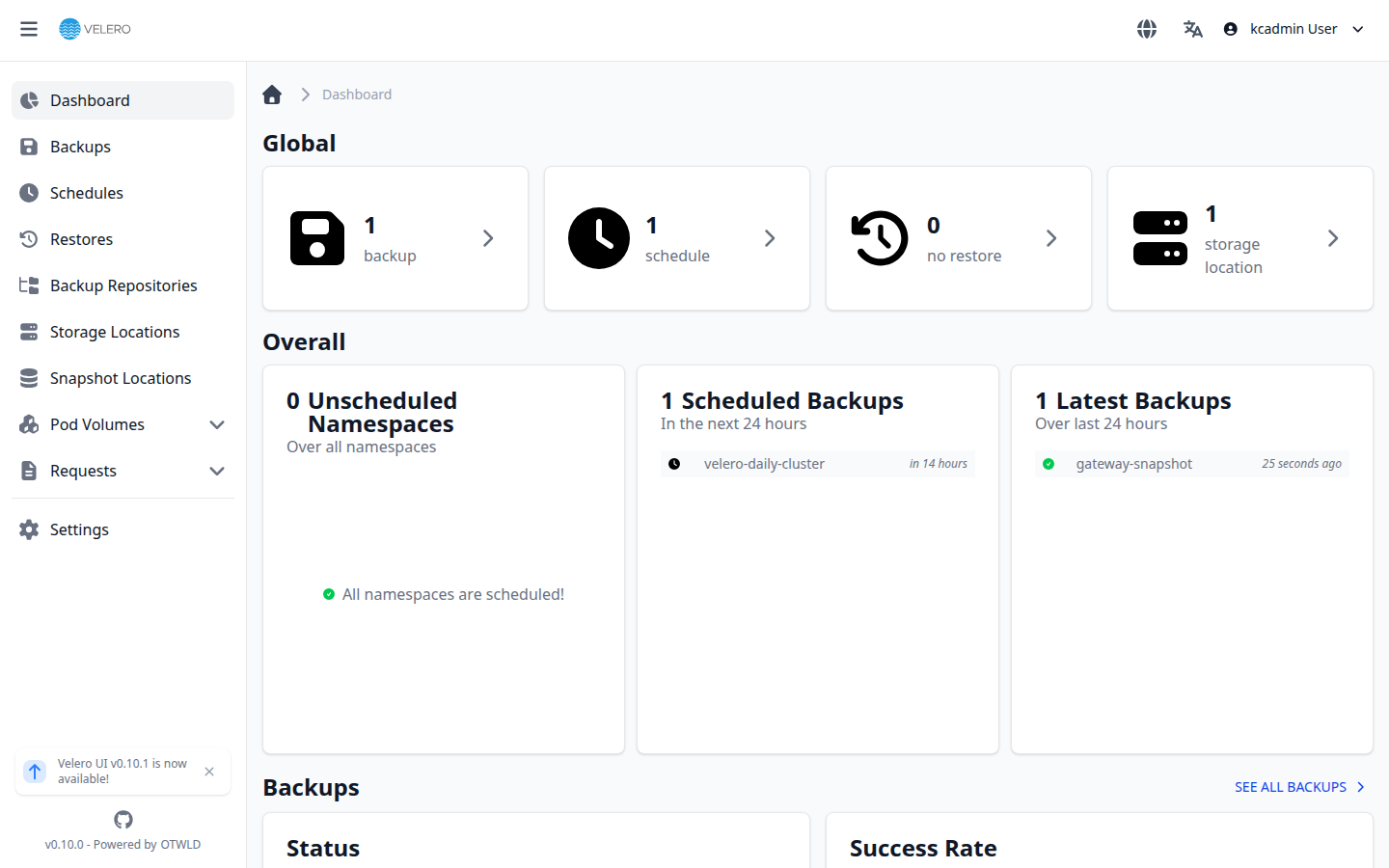
- Single sign-on. Log in with the same Keycloak identity as the console and Grafana — no separate credentials. The UI runs the OIDC authorization-code flow natively against Keycloak; an HTTP request redirects to HTTPS automatically.
- Admin-group access. A built-in authorization policy grants full manage (view, create, restore) only to members of the
opsta-adminsorbackup-adminsKeycloak groups; everyone else is denied. Restores are destructive, so add a backup operator tobackup-adminsto grant backup rights without full platform-admin. - What you can do. List and inspect backups and restores, trigger an on-demand backup or a restore, and review schedules — a GUI over the same operations available from the
veleroCLI.
From the CLI those same backups are at kubectl -n velero get backups.velero.io — use the fully qualified kind, since a bare backup resolves to CloudNativePG's CRD.
Next steps
- High availability — survive node failures without a restore.
- Upgrades — back up first, every time.
- Reference architecture → DR objectives — topologies, sizing, and the security/compliance posture.