

การร้องขอที่ถูกบล็อก
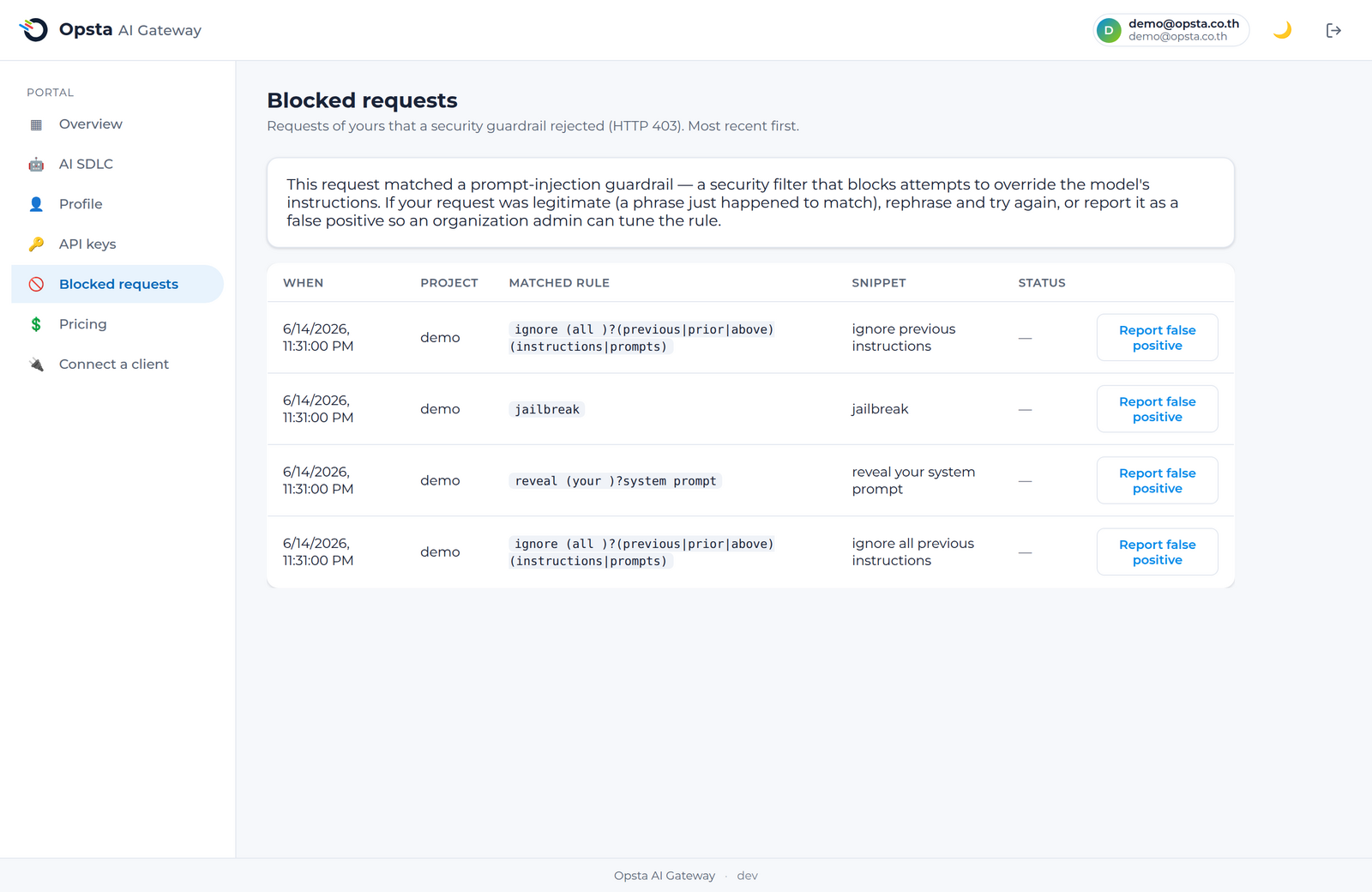
หากคำร้องขอถูกปฏิเสธโดยระบบป้องกัน (guardrail) ซึ่งไม่ใช่เรื่องของงบประมาณ ระบบจะส่งสถานะ 403 กลับมา และจะแสดงข้อมูลดังกล่าวในหน้า การร้องขอที่ถูกบล็อก (Blocked requests) โดยคุณสามารถตรวจสอบเหตุผลที่ถูกบล็อกและรายงานในกรณีที่เป็นการตรวจจับผิดพลาด (false positive) ได้ที่หน้านี้
สิ่งที่ต้องเตรียมความพร้อม
เข้าสู่ระบบเรียบร้อยแล้ว (วิธีการเข้าใช้งาน)
เหตุผลที่คำร้องขอถูกบล็อก
ระบบ guardrail จะทำการคัดกรองทุก ๆ คำร้องขอก่อนจะส่งไปถึงโมเดล คำร้องขอจะถูกบล็อกเมื่อตรวจพบข้อมูลที่ตรงกับเงื่อนไขดังต่อไปนี้
- กฎการตรวจจับข้อมูลส่วนบุคคล (PII) เช่น ข้อมูลที่ละเอียดอ่อนอย่างอีเมล หมายเลขโทรศัพท์ หรือคีย์ต่าง ๆ หรือ
- กฎการป้องกันการป้อนคำสั่งที่ไม่ปลอดภัย (prompt-injection) ทั้งแบบอิงตามรูปแบบหรือแบบอิงตามความหมาย เพื่อป้องกันการหลอกล่อหรือแทรกแซงโมเดล
คำร้องขอที่ถูกบล็อกจะไม่มีวันส่งไปถึงผู้ให้บริการต้นทาง ดังนั้นจึงไม่มีการหักค่าใช้จ่ายใด ๆ ออกจากงบประมาณของคุณ
การตรวจสอบและการรายงานข้อมูล
- เปิดหน้า Blocked requests บน console
- ค้นหาคำร้องขอดังกล่าว ซึ่งคุณจะพบข้อมูลเวลาที่ใช้งานและกฎของ guardrail ที่ตรวจพบข้อผิดพลาด
- หากคำร้องขอนั้นถูกบล็อกอย่างไม่ถูกต้อง ให้คลิก Report เพื่อทำเครื่องหมายว่าเป็นรายงานเท็จ (false positive) จากนั้นผู้ดูแลระบบระดับองค์กร (org admin) จะสามารถนำข้อมูลนี้ไปปรับปรุงกฎของ guardrail ต่อไปได้
วิธีแยกแยะความแตกต่างระหว่างสถานะ 403 และ 429
สถานะ 403 หมายถึงระบบ guardrail บล็อกเนื้อหาของคำร้องขอ ส่วนสถานะ 429 หมายถึงยอดการใช้งานของคุณถึงเกณฑ์งบประมาณหรือขีดจำกัดจำนวน token แล้ว ดูรายละเอียดเพิ่มเติมได้ที่ ปริมาณการใช้งานและงบประมาณ โดยสามารถดูตารางเปรียบเทียบในหน้า วงจรชีวิตของการร้องขอ เพื่อทำความเข้าใจว่าแต่ละสถานะมาจาก Gate ใด
ขั้นตอนต่อไป
- สำหรับผู้ดูแลระบบ สามารถเข้าไปปรับจูนกฎการทำงานได้ที่หน้า ระบบป้องกัน (Guardrails)