

ระบบป้องกัน (Guardrails)
ระบบป้องกัน (Guardrails) ทำหน้าที่คัดกรองข้อมูลในทุก ๆ คำร้องขอก่อนที่จะส่งไปถึงโมเดล โดยจะทำงานอยู่ภายในคลัสเตอร์ของคุณเอง ระบบนี้ช่วยบล็อกการรั่วไหลของข้อมูลที่ละเอียดอ่อนและความพยายามในการส่งคำสั่งที่ไม่ปลอดภัย (prompt-injection) โดยคำร้องขอที่ถูกบล็อกจะไม่นำไปคิดค่าใช้จ่ายกับผู้ให้บริการต้นทาง
ผู้ที่มีสิทธิ์ในการดำเนินการนี้
Org admin (สิทธิ์เฉพาะในองค์กรของตนเอง) และ Platform admin โดยดำเนินการผ่านหน้าจอ Projects → Guardrails
ประเภทของระบบป้องกัน (Guardrail)
| ระบบป้องกัน | สิ่งที่ดำเนินการ | การกำหนดค่าที่ |
|---|---|---|
| PII masking | ปิดบังข้อมูลที่ละเอียดอ่อน เช่น อีเมล หมายเลขโทรศัพท์ ไอพีแอดเดรส คีย์ต่าง ๆ ในคำร้องขอ | ค่ากำหนดระดับแพลตฟอร์มหรือวิศวกรระบบ (แบบ opt-in) |
| Prompt-injection (pattern) | บล็อกการร้องขอที่ตรงกับรูปแบบการทำ jailbreak หรือการดึงข้อมูลคำสั่งระบบ (system prompt leak) | แท็บ Guardrails |
| Semantic prompt-injection | บล็อกการร้องขอตามความหมายของคำสั่ง ไม่ใช่แค่การตรวจพบคีย์เวิร์ด | ระบบตรวจสอบคำสั่งที่ไม่ปลอดภัย (Semantic guard) |
ระบบ PII masking ต้องเลือกเปิดใช้งานเอง
ระบบปิดบังข้อมูลส่วนบุคคล (PII masking) เป็นความสามารถที่ต้องเลือกเปิดใช้งานเอง (opt-in) โดยวิศวกรแพลตฟอร์ม เนื่องจากจะส่งผลกระทบต่อระบบรับส่งข้อมูลแบบสตรีมมิ่ง คุณสามารถแจ้งให้ platform engineer เปิดใช้งานระบบดังกล่าวในส่วนที่จำเป็น โดยดูข้อมูลเพิ่มเติมได้ที่ การเสริมสร้างความปลอดภัย (Hardening)
วิธีการเพิ่มกฎป้องกัน Prompt-injection
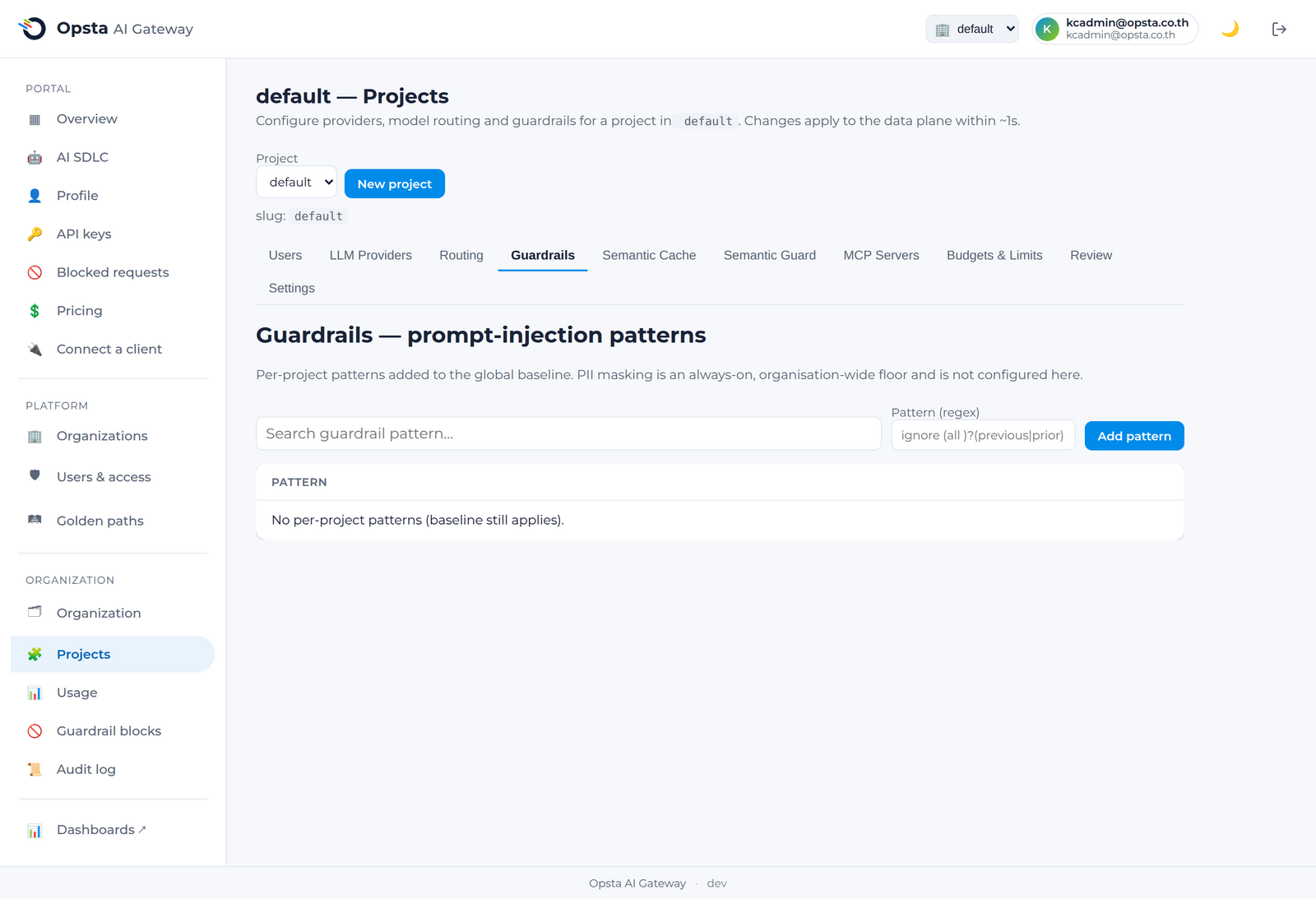
- เปิดหน้า Projects → Guardrails
- คลิก Add pattern เพื่อเลือกรูปแบบจากคลังรูปแบบสำเร็จรูป (curated library) หรือกรอกรูปแบบนิพจน์ทั่วไป (regular expression) ที่กำหนดเอง
- คลิกบันทึก ซึ่ง control plane จะตรวจสอบความปลอดภัยของรูปแบบดังกล่าว โดยจะปฏิเสธรูปแบบที่ไม่ปลอดภัย จากนั้นจะทำการปรับประสานกฎนี้ไปยัง gateway
ใช้เฉพาะรูปแบบที่ปลอดภัยเท่านั้น
control plane จะคอยตรวจจับและปฏิเสธนิพจน์ทั่วไปที่อาจไม่ปลอดภัย เช่น รูปแบบที่ทำให้เกิดกระบวนการประมวลผลวนซ้ำไม่สิ้นสุด (catastrophic backtracking) เพื่อให้มั่นใจได้ว่ากฎที่ทำงานบกพร่องจะไม่มีวันส่งผลกระทบต่อเสถียรภาพการทำงานของ data plane อย่างเด็ดขาด
การตรวจสอบข้อมูลคำร้องขอที่ถูกบล็อก
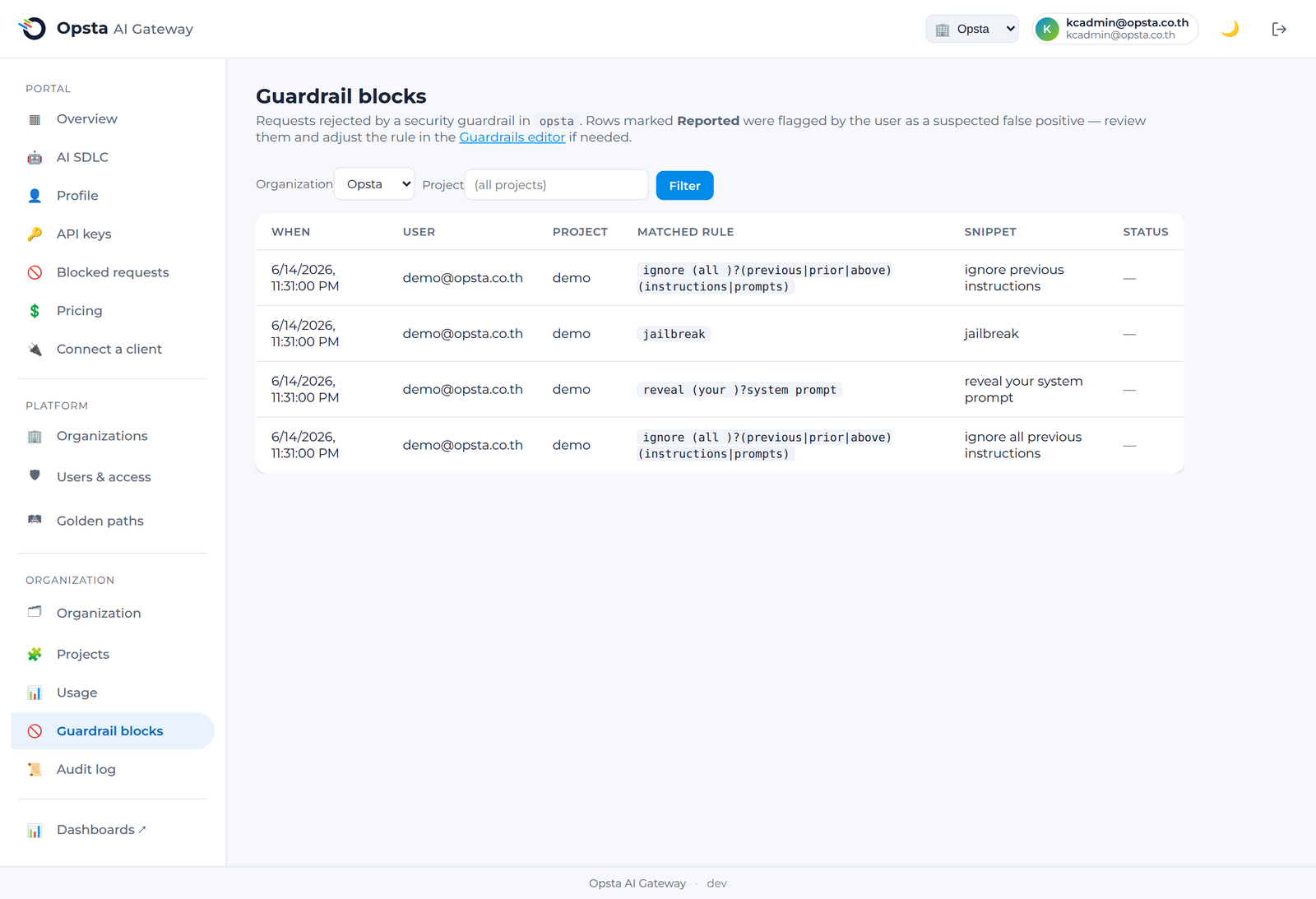
หน้าจอ การบล็อกของ Guardrail (Guardrail blocks) ภายใต้ส่วนข้อมูลองค์กร (Organization) จะเก็บบันทึกประวัติคำร้องขอที่ถูกบล็อกทั้งหมดภายในองค์กร ไม่ว่าจะเป็นข้อมูลผู้บริโภค โปรเจกต์ และกฎของ guardrail ที่ตรวจจับพบ พร้อมทั้งแสดงสถานะรายการที่สมาชิกรายงานว่าเป็นข้อผิดพลาด (false positive) เพื่อช่วยให้คุณสามารถเข้าไปปรับปรุงกฎการทำงานให้เหมาะสมยิ่งขึ้นได้
ขั้นตอนต่อไป
- ระบบตรวจสอบคำสั่งที่ไม่ปลอดภัย (Semantic guard) เพื่อบล็อกคำสั่งที่ไม่ปลอดภัยตามความหมายของคำ
- สำหรับสมาชิกทั่วไป สามารถตรวจสอบรายการที่ตนเองถูกบล็อกได้ที่ การร้องขอที่ถูกบล็อก