

ระบบแคชตามความหมาย (Semantic cache)
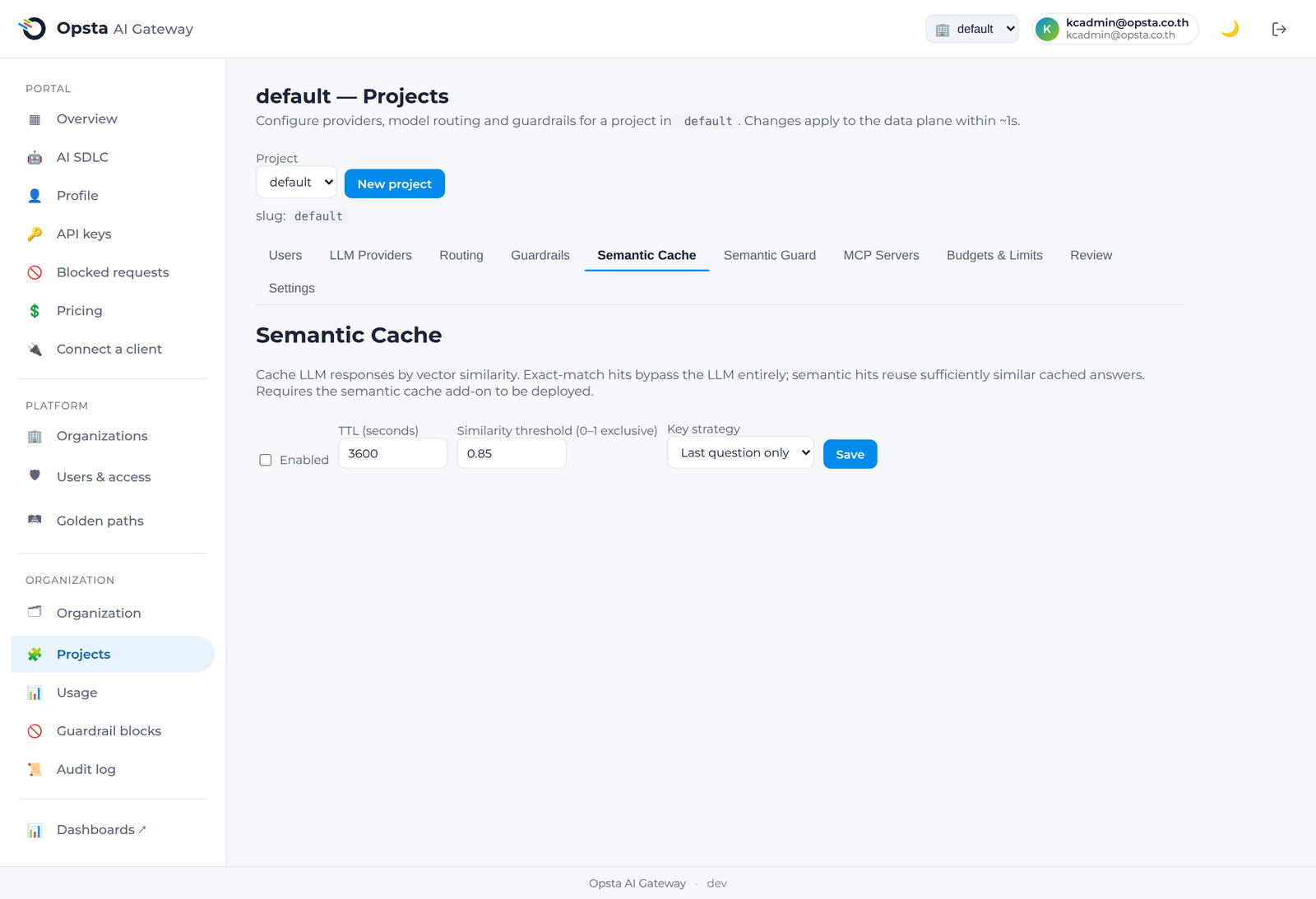
ระบบแคชตามความหมาย (Semantic cache) จะทำหน้าที่ส่งคืนคำตอบที่จัดเก็บไว้ในแคชเมื่อพบว่า prompt ใหม่มีความหมายที่คล้ายคลึงกับคำร้องขอก่อนหน้า โดยข้ามขั้นตอนการเรียกใช้งานโมเดลไปทั้งหมดและช่วยประหยัดค่าใช้จ่าย token ทั้งหมด ระบบนี้ทำงานแยกเฉพาะรายโปรเจกต์ ต้องเลือกเปิดใช้งานเอง และมีการแยกข้อมูลอย่างเป็นเอกเทศตามแต่ละผู้เช่า
ไม่เหมาะกับงานเขียนโค้ดหรือ agent
อย่าเปิดใช้งาน semantic cache สำหรับโปรเจกต์ที่ใช้กับไคลเอนต์เขียนโค้ด/agent (opencode, Cursor หรืออะไรก็ตามที่สตรีมคำตอบและใช้ tool call) เพราะ semantic cache จะตัดทอนคำตอบ tool-call แบบสตรีม และอาจส่งคืนคำตอบที่คล้ายแต่ผิดให้กับขั้นตอนอื่นของ agent ทำให้ agent ค้างหรือทำงานผิดพลาด ควรใช้เฉพาะกับแชตแบบไม่สตรีม (FAQ) เท่านั้น และปิดไว้สำหรับโปรเจกต์เขียนโค้ด/agent
ผู้ที่มีสิทธิ์ในการดำเนินการนี้
Org admin (สิทธิ์เฉพาะในองค์กรของตนเอง) และ Platform admin โดยดำเนินการผ่านหน้าจอ Projects → Semantic Cache
การเปิดใช้งานและการปรับจูน
- เปิดหน้า Projects → Semantic Cache และสลับสวิตช์เพื่อเปิดใช้งาน
- กำหนดค่า TTL เพื่อตั้งระยะเวลาที่คำตอบในแคชจะยังคงถูกต้องและใช้งานได้
- กำหนดค่า ระดับความคล้ายคลึง (similarity threshold) เพื่อระบุว่า prompt ใหม่ต้องมีความคล้ายคลึงกับข้อมูลในแคชมากเพียงใดจึงจะถือว่าตรวจพบข้อมูล โดยการตั้งค่าสูงจะมีความเข้มงวดมากขึ้น ส่งผลให้ตรวจพบข้อมูลน้อยลงแต่มีความปลอดภัยและแม่นยำสูงขึ้น
- เลือก กลยุทธ์การตรวจจับคีย์ (key strategy) ว่าจะจับคู่จากเฉพาะคำถามล่าสุดหรือจากบทสนทนาทั้งหมด
- คลิกบันทึก
ประโยชน์ของระบบแคชตามความหมาย
เมื่อตรวจพบข้อมูลในแคช (cache hit) ระบบจะตอบกลับข้อมูลทันทีก่อนจะส่งข้อมูลไปถึงผู้ให้บริการต้นทาง ดังนั้นจึงไม่มีการคิดค่าใช้จ่ายใด ๆ หักจากงบประมาณของโปรเจกต์ ข้อมูลตอบกลับในแคชจะถูกแยกส่วนเป็นเอกเทศในแต่ละโปรเจกต์ ซึ่งข้อมูลคำตอบของโปรเจกต์หนึ่งจะไม่มีวันถูกดึงไปแสดงให้แก่อีกโปรเจกต์หนึ่งอย่างเด็ดขาด โดยยอดประหยัดค่าใช้จ่ายดังกล่าวจะแสดงรายละเอียดให้เห็นบนหน้าจอข้อมูลการใช้งานและแดชบอร์ดของโปรเจกต์
แนะนำในการปรับจูนระดับความคล้ายคลึง
เริ่มต้นโดยกำหนดค่าให้มีความเข้มงวดสูงไว้ก่อน จากนั้นค่อย ๆ ปรับลดค่าลงพร้อมกับคอยตรวจสอบคุณภาพคำตอบ หากกำหนดค่าต่ำเกินไป prompt ที่ไม่เกี่ยวข้องกันอาจถูกประเมินว่ามีคำตอบเดียวกัน แต่หากกำหนดค่าสูงเกินไปคุณจะตรวจพบข้อมูลในแคชน้อยลง
ขั้นตอนต่อไป
- ระบบตรวจสอบคำสั่งที่ไม่ปลอดภัย (Semantic guard) เพื่อศึกษาวิธีการใช้งานเวกเตอร์ในลักษณะเดียวกันในการดูแลความปลอดภัยของระบบ
- งบประมาณและขีดจำกัด เพื่อตรวจสอบยอดประหยัดค่าใช้จ่ายที่เกิดขึ้นจริง