

ประวัติการใช้งาน (Audit log)
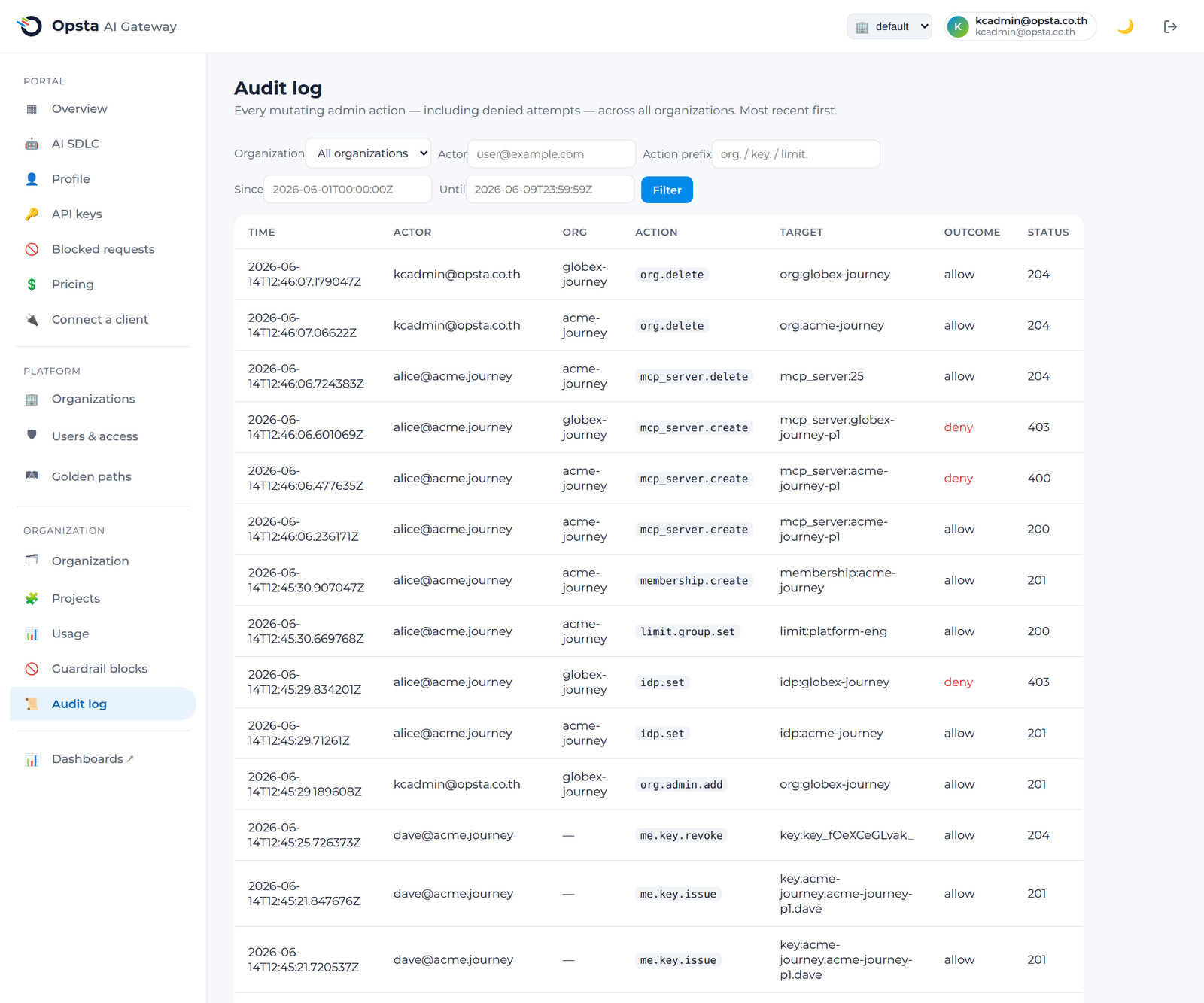
ประวัติการใช้งาน (Audit log) จะบันทึกทุกการกระทำของผู้ดูแลระบบที่มีการเปลี่ยนแปลงค่ากำหนด รวมถึงความพยายามดำเนินการที่ถูกปฏิเสธ ทำให้คุณมีประวัติการบันทึกการทำงานที่ละเอียดครบถ้วนและสามารถกรองเพื่อตรวจสอบได้ว่าใครเป็นผู้ดำเนินการเปลี่ยนแปลงค่าใดและเมื่อใดบ้าง
ผู้ที่มีสิทธิ์ในการเข้าถึงข้อมูลนี้
Org admin สามารถเข้าถึงประวัติการใช้งานขององค์กรของตนเองได้ ส่วน Platform admin จะสามารถเข้าถึงประวัติของทุกองค์กรและสามารถกรองข้อมูลแยกตามรายองค์กรได้
ข้อมูลที่ถูกเก็บบันทึก
ข้อมูลในแต่ละรายการประกอบด้วย ผู้ดำเนินการ (actor) เช่น อีเมลและกลุ่ม องค์กร (organization) การกระทำ (action) เช่น provider.create, key.revoke, org.delete เป้าหมาย (target) ผลลัพธ์ (outcome) ว่าได้รับอนุญาตหรือถูกปฏิเสธ และ HTTP status นอกจากนี้ความพยายามใด ๆ ที่ถูกปฏิเสธก็จัดเก็บไว้เช่นกัน ซึ่งมีประโยชน์อย่างยิ่งในการตรวจสอบกิจกรรมที่เข้าข่ายไม่ได้รับอนุญาต
การกรองและตรวจสอบข้อมูล
- เปิดหน้า Audit log ภายใต้ส่วน Organization ทั้งนี้ผู้ดูแลระบบแพลตฟอร์มสามารถเลือกกรองแยกตามองค์กรเพิ่มเติมได้
- กรองข้อมูลโดยระบุ ผู้ดำเนินการ (actor) ผ่านอีเมล หรือระบุส่วนนำหน้าการกระทำ เช่น
org.,key.,limit.และระบุ ช่วงวันที่ (date range) - เลือกเปลี่ยนหน้าเพื่อตรวจสอบผลลัพธ์การค้นหา
ระยะเวลาการจัดเก็บข้อมูล
วิศวกรระบบแพลตฟอร์มจะเป็นผู้กำหนดระยะเวลาจัดเก็บประวัติการทำงานเหล่านี้ ดูรายละเอียดเพิ่มเติมได้ที่ การตรวจสอบประวัติและการปฏิบัติตามข้อกำหนด
ขั้นตอนต่อไป
- รูปแบบสิทธิ์การเข้าใช้งาน (RBAC) — บทบาทหน้าที่ต่าง ๆ ที่จะถูกตรวจสอบประวัติการทำงาน
- การตรวจสอบประวัติและการปฏิบัติตามข้อกำหนด — รายละเอียดการเก็บรักษาข้อมูลและการปฏิบัติตามข้อกำหนดต่าง ๆ