

การจัดเส้นทาง (Routing)
การจัดเส้นทาง (Routing) คือการจับคู่โมเดลเชิงตรรกะ (logical model) ที่ฝั่งไคลเอนต์เรียกใช้งาน เช่น coding-default เข้ากับผู้ให้บริการและโมเดลต้นทาง การอ้างอิงทางอ้อมในลักษณะนี้เป็นเสมือนข้อกำหนดข้อตกลงที่เสถียร โดยทางไคลเอนต์จะเรียกใช้งานผ่านชื่อเชิงตรรกะ และคุณสามารถปรับการเชื่อมโยงเส้นทางใหม่ได้ตลอดเวลาโดยไม่ต้องแก้ไขโค้ดฝั่งไคลเอนต์เลย
ผู้ที่มีสิทธิ์ในการดำเนินการนี้
Org admin (สิทธิ์เฉพาะในองค์กรของตนเอง) และ Platform admin โดยดำเนินการผ่านหน้าจอ Projects → Routing
การเพิ่มเส้นทาง (Route)
- เปิดหน้า Projects → Routing
- คลิก Add route
- กำหนดชื่อ logical model ซึ่งเป็นชื่อเชิงตรรกะที่ฝั่งไคลเอนต์จะส่งเข้ามา เช่น
coding-defaultหรือbulkเป็นต้น - เลือก provider ที่ ได้เพิ่มไว้ที่นี่ และระบุ upstream model ที่ผู้ให้บริการรายนั้นเปิดให้ใช้งาน
- คลิกบันทึก ซึ่งคำร้องขอสำหรับการเรียกโมเดลเชิงตรรกะนี้จะถูกจัดเส้นทางไปยังผู้ให้บริการและโมเดลที่เลือกโดยอัตโนมัติ
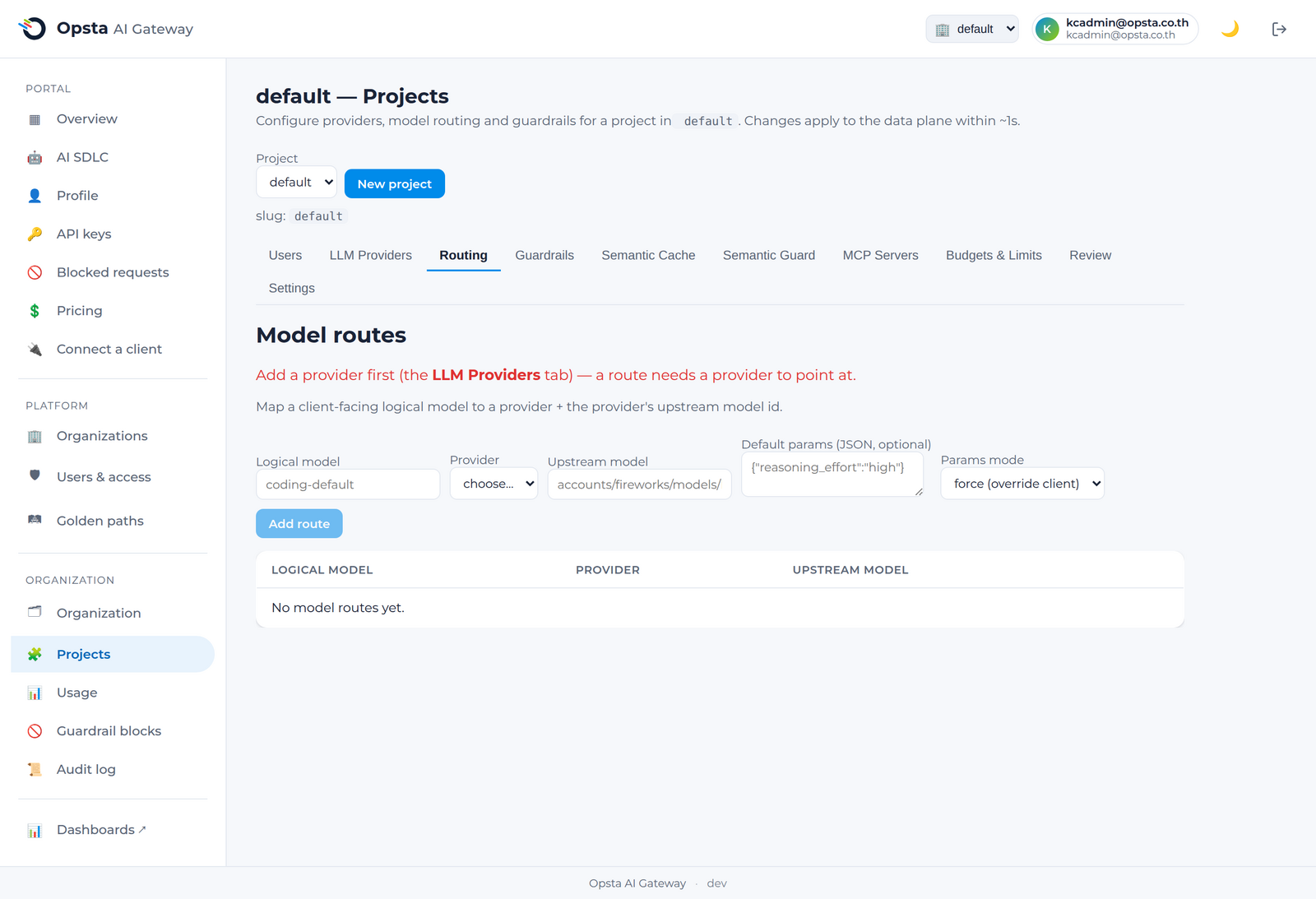
แนวทางการบังคับใช้งานระบบจัดเส้นทาง
เมื่อคำร้องขอส่งมาถึง gateway ระบบจะทำการแปลงฟิลด์ model ผ่านเส้นทางเหล่านี้ก่อนที่จะทำการตรวจสอบงบประมาณและส่งไปยังผู้ให้บริการต้นทาง โดยสามารถดูรายละเอียดเพิ่มเติมได้ที่ วงจรชีวิตของการร้องขอ และเนื่องจากชื่อโมเดลเชิงตรรกะทำหน้าที่เป็นข้อตกลงที่เสถียร คุณจึงสามารถสลับผู้ให้บริการหรือโมเดลต้นทางของการจัดเส้นทางได้โดยที่ฝั่งไคลเอนต์จะไม่ได้รับผลกระทบใด ๆ ทั้งสิ้น
รักษาชื่อเชิงตรรกะให้คงที่เสมอ
โปรดตกลงเรื่องการใช้งานชื่อเชิงตรรกะร่วมกับทีมพัฒนาของคุณ เช่น coding-default หรือ bulk และดูแลให้ชื่อเหล่านั้นคงที่เสมอ จากนั้นคุณสามารถสลับเปลี่ยนผู้ให้บริการต้นทางที่อยู่เบื้องหลังได้ตามความต้องการด้านค่าใช้จ่ายหรือระดับคุณภาพที่เปลี่ยนแปลงไป
ขั้นตอนต่อไป
- งบประมาณและขีดจำกัด เพื่อควบคุมและกำหนดเพดานค่าใช้จ่ายสำหรับเส้นทางเหล่านี้
- การกำหนดราคาโมเดล เพื่อกำหนดเกณฑ์การคำนวณค่าใช้จ่ายสำหรับระบบงบประมาณ