

ผู้ให้บริการ (Providers)
ผู้ให้บริการ (Provider) คือบริการ AI ต้นทางที่คุณเชื่อมต่อเข้ากับโปรเจกต์ โดย gateway รองรับผู้ให้บริการต้นทางที่เข้ากันได้กับมาตรฐาน OpenAI, DeepSeek, Anthropic รวมถึง endpoint ทั่วไป ข้อมูลรับรองการใช้งานของผู้ให้บริการจะถูกจัดเก็บเป็นความลับเฉพาะองค์กร (organization secret) โดยจะไม่มีวันจัดเก็บในรูปแบบข้อความธรรมดา (plaintext) และจะไม่มีการเปิดเผยกลับมาทาง API อีก
ผู้ที่มีสิทธิ์ในการดำเนินการนี้
Org admin (สิทธิ์เฉพาะในองค์กรของตนเอง) และ Platform admin โดยดำเนินการผ่านหน้าจอ Projects → LLM Providers
การเพิ่มผู้ให้บริการ
- เปิดหน้า Projects เลือกโปรเจกต์ที่ต้องการ และไปที่แท็บ LLM Providers
- คลิก Add provider จากนั้นเลือกประเภท ได้แก่ OpenAI-compatible, DeepSeek, Anthropic หรือ generic
- ระบุ base URL และ API key สำหรับผู้ให้บริการรายนั้น
- คลิก Test connection เพื่อทดสอบความถูกต้องของสิทธิ์การเชื่อมต่อก่อนทำการบันทึกข้อมูล
- คลิกบันทึก ซึ่งผู้ให้บริการรายนี้จะพร้อมใช้งานในขั้นตอน การจัดเส้นทาง (Routing) ต่อไป
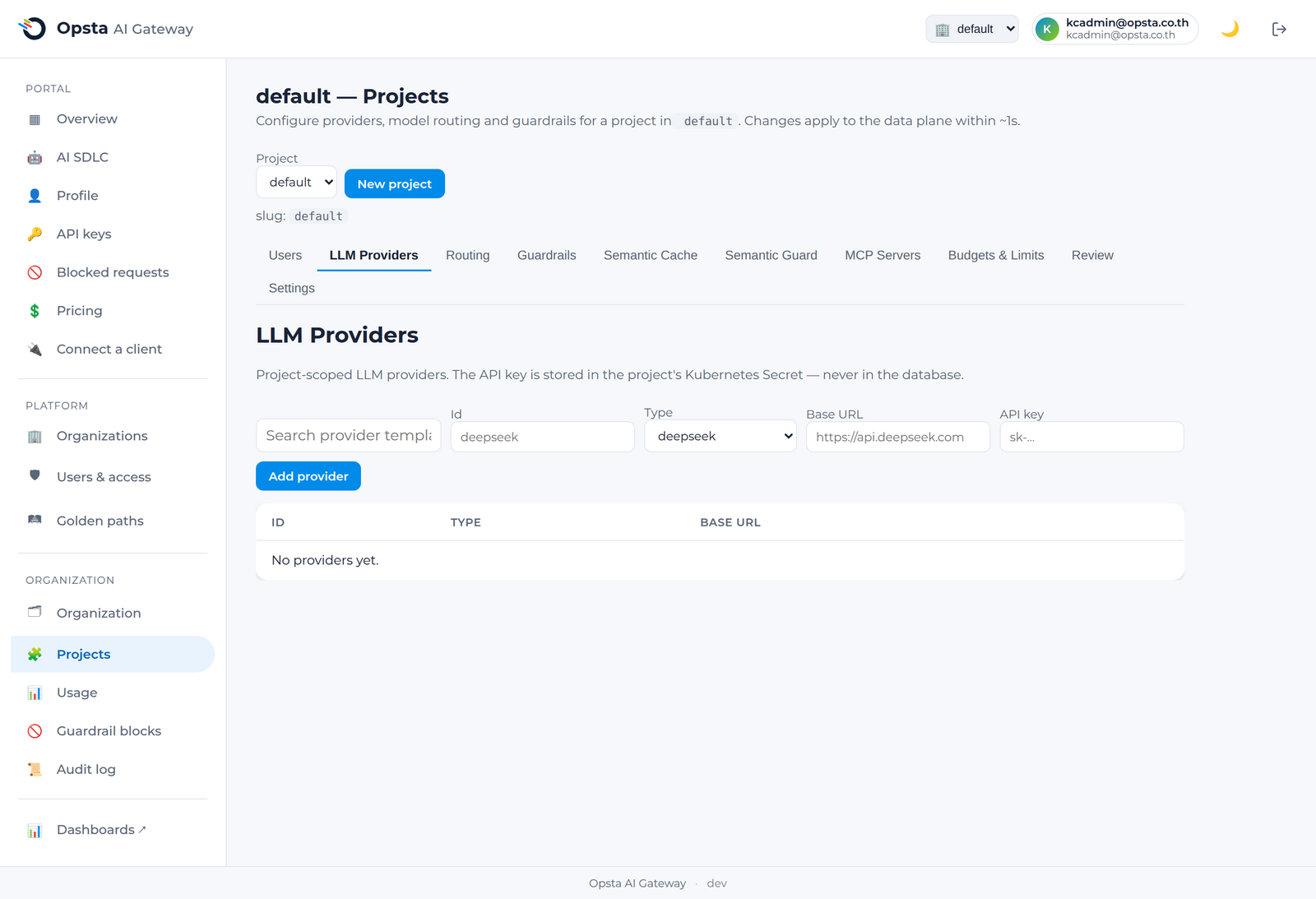
ข้อมูลสิทธิ์การใช้งานจะถูกเก็บเป็นความลับ
API key ของผู้ให้บริการจะถูกบันทึกไว้ใน Kubernetes Secret แยกเป็นรายองค์กรโดยฝั่ง control plane ข้อมูลเหล่านี้จะไม่ถูกส่งกลับมาในการตอบกลับของ API ใด ๆ และไม่มีวันหลุดออกนอกคลัสเตอร์ของคุณ
การจัดการผู้ให้บริการ
แท็บ Providers จะแสดงรายชื่อผู้ให้บริการทั้งหมดของโปรเจกต์ คุณสามารถคลิกทดสอบ (test) ความเชื่อมต่อของผู้ให้บริการใหม่ได้ตลอดเวลา หรือสามารถลบผู้ให้บริการออกได้หลังจากที่ทำการยกเลิกเส้นทางที่ชี้มายังผู้ให้บริการรายนี้ออกแล้ว
ขั้นตอนต่อไป
ดูข้อมูลคู่มือ การจัดเส้นทาง (Routing) เพื่อแมปโมเดลเชิงตรรกะเข้ากับผู้ให้บริการรายนี้