

แนะนำการใช้งาน Console
web console คือเครื่องมือหลักสำหรับผู้ดูแลระบบในการบริหารจัดการแพลตฟอร์ม โดยไม่จำเป็นต้องใช้ command line ไม่ต้องเข้าถึงระบบ Kubernetes และไม่ต้องเขียนไฟล์ YAML หน้านี้จะช่วยแนะนำการใช้งานเบื้องต้นแก่คุณ ส่วนรายละเอียดการกำหนดค่าต่าง ๆ จะมีอธิบายอย่างเจาะลึกในคู่มือสำหรับผู้ดูแลระบบฉบับนี้
ระดับสิทธิ์ในการมองเห็นข้อมูล
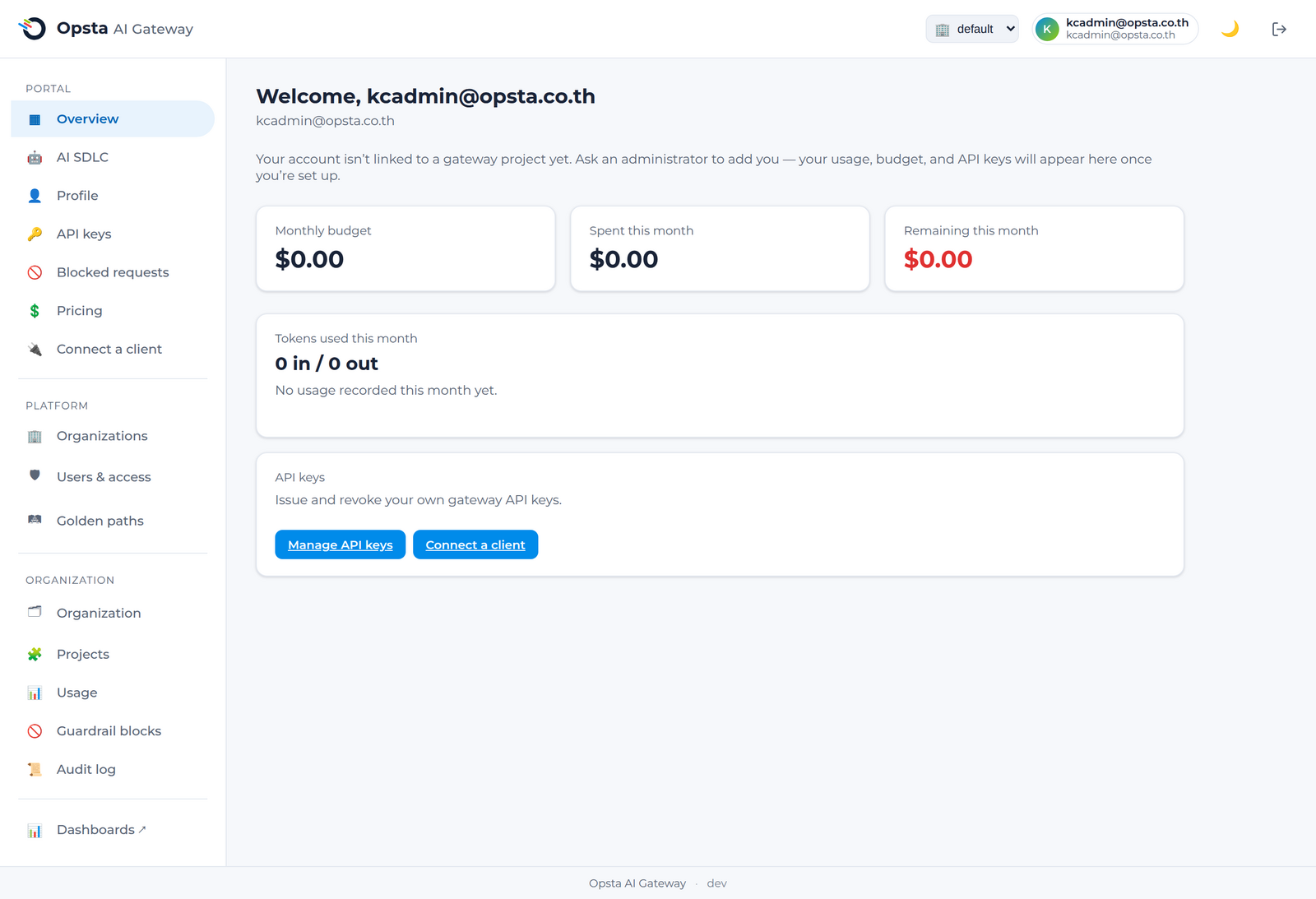
หน้าจอ console จะแสดงเนื้อหาและส่วนต่าง ๆ แตกต่างกันไปตามบทบาทหน้าที่ (RBAC) ได้แก่ สมาชิกทั่วไป (member) จะมองเห็นเฉพาะพอร์ทัลส่วนตัว ผู้ดูแลระบบระดับองค์กร (org admin) จะมองเห็นส่วนการจัดการขององค์กรเพิ่มเติม และผู้ดูแลระบบแพลตฟอร์ม (platform admin) จะมองเห็นข้อมูลทั้งหมดของทุกองค์กร
เมนูการใช้งาน (Navigation)
เมนูด้านซ้ายจะถูกจัดกลุ่มตามขอบเขตการใช้งาน ดังนี้
- Portal (ผู้ใช้งานทุกคน): ภาพรวม (Overview), โปรไฟล์ (Profile), API key, การร้องขอที่ถูกบล็อก (Blocked requests) และการเชื่อมต่อฝั่งไคลเอนต์ (Connect a client)
- Organization (ผู้ดูแลระบบองค์กรและแพลตฟอร์ม): ข้อมูลองค์กร (Organization), โปรเจกต์ (Projects), ปริมาณการใช้งาน (Usage), การบล็อกของ Guardrail (Guardrail blocks) และประวัติการใช้งาน (Audit log)
- Platform (ผู้ดูแลระบบแพลตฟอร์มเท่านั้น): รายชื่อองค์กร (Organizations), ผู้ใช้งานและสิทธิ์เข้าถึง (Users & access) และการกำหนดราคาโมเดล (Pricing)
การตั้งค่าระบบครั้งแรก
คู่มือการตั้งค่า (Setup guide) บนหน้าแรกของผู้ดูแลระบบจะนำคุณผ่านขั้นตอนต่าง ๆ ได้แก่ สร้างองค์กร → เชื่อมต่อผู้ให้บริการระบุตัวตน → เชิญผู้ดูแลระบบระดับองค์กร → ผู้ใช้งานลงชื่อเข้าใช้งาน → ระบบแมปกลุ่มโดยอัตโนมัติ ซึ่งคุณสามารถกดปิดหน้านี้ได้เมื่อดำเนินการเสร็จสิ้น
แนะนำขั้นตอนการทำงานถัดไป
| สิ่งที่ต้องการทำ | ไปที่หน้าจอ |
|---|---|
| สร้างองค์กร เชิญสมาชิก และกำหนดบทบาท | องค์กรและสมาชิก |
| ตั้งค่าผู้ให้บริการ การจัดเส้นทาง guardrail งบประมาณ และ MCP ของโปรเจกต์ | โปรเจกต์ |
| เชื่อมต่อผู้ให้บริการระบุตัวตนขององค์กร | SSO และ IdP |
| ตรวจสอบปริมาณการใช้งานและยอดค่าใช้จ่ายภายในองค์กร | งบประมาณและขีดจำกัด |
| ตรวจสอบประวัติการเปลี่ยนแปลงของผู้ดูแลระบบทั้งหมด | ประวัติการใช้งาน (Audit log) |