

เซิร์ฟเวอร์ MCP (MCP servers)
MCP gateway ช่วยให้คุณสามารถมอบสิทธิ์การเข้าถึงเครื่องมือภายใต้การควบคุมให้แก่ AI agent ของคุณได้ โดยคุณสามารถลงทะเบียนเซิร์ฟเวอร์ Model Context Protocol (MCP) ระยะไกลแยกตามแต่ละโปรเจกต์ ซึ่งระบบ gateway จะทำหน้าที่ช่วยคัดกรองการเข้าถึงโดยอ้างอิงสิทธิ์การยืนยันตัวตน การแยกส่วนข้อมูล และระบบตรวจสอบประวัติการใช้งานแบบเดียวกันกับการรับส่งข้อมูลของ LLM
ผู้ที่มีสิทธิ์ในการดำเนินการนี้
Org admin (สิทธิ์เฉพาะในองค์กรของตนเอง) และ Platform admin โดยดำเนินการผ่านหน้าจอ Projects → MCP Servers
ขั้นตอนการรับส่งข้อมูลการร้องขอของ MCP ภายใต้การควบคุม
คำร้องขอจะต้องมี API key ของโปรเจกต์ที่ถูกต้องสำหรับการยืนยันตัวตน (key-auth) และจะสามารถเข้าถึงได้เฉพาะเส้นทางที่กำหนดไว้ในโปรเจกต์ของตนเองเท่านั้นสำหรับการป้องกันระดับผู้เช่า (tenant guard) โดยการใช้คีย์จากโปรเจกต์อื่นจะได้รับสถานะ 403 กลับไป
การลงทะเบียนเซิร์ฟเวอร์
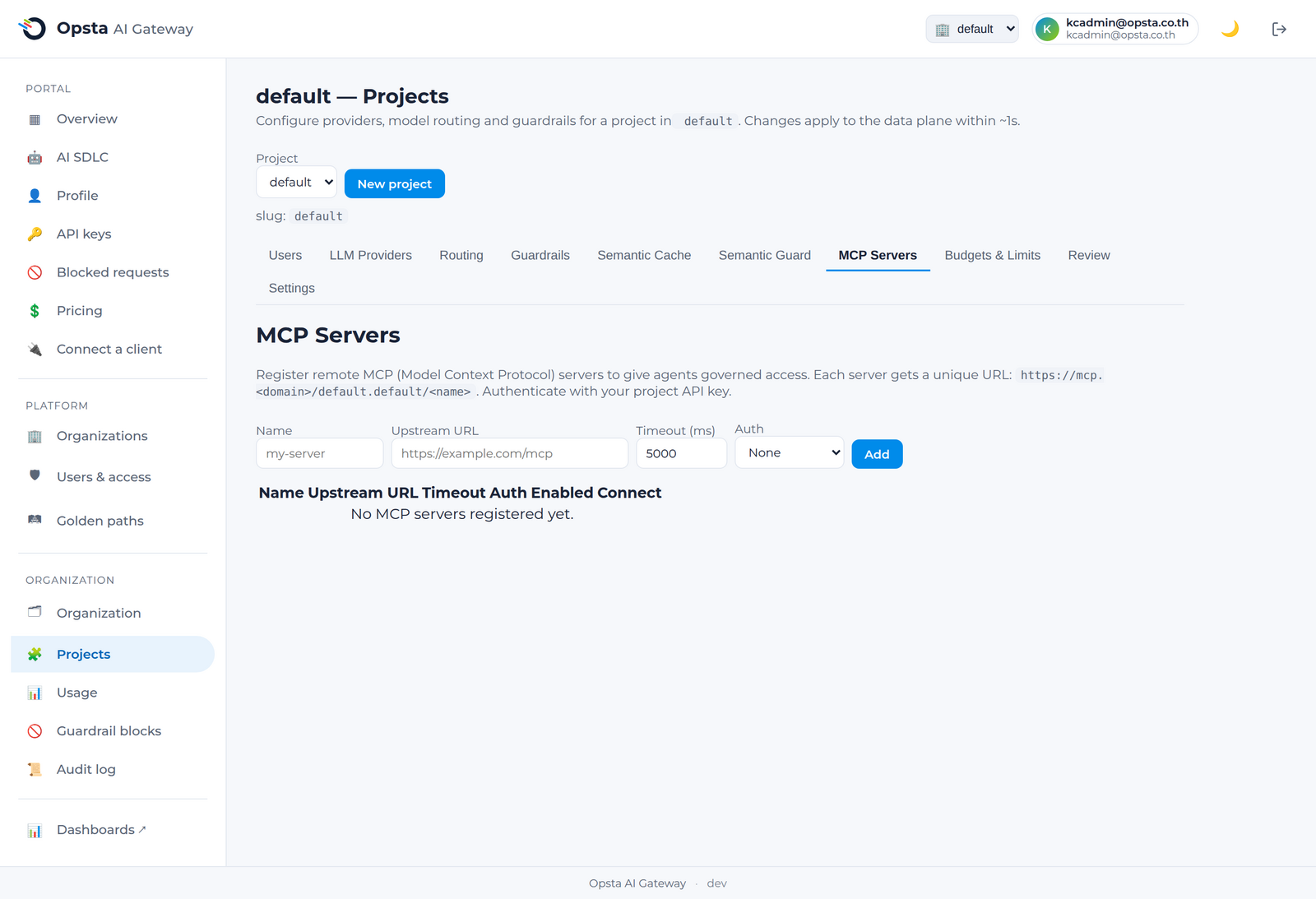
- เปิดหน้า Projects → MCP Servers และคลิก Add server
- กำหนด ชื่อ (name) ระบุ URL ของเซิร์ฟเวอร์ MCP ต้นทาง (backend MCP server URL) ตั้งค่า เวลาหมดอายุ (timeout) และข้อมูลรับรองสิทธิ์ของระบบต้นทางหากระบบต้นทางต้องการ
- สลับสวิตช์ enabled เพื่อเปิดใช้งานและทำการบันทึก โดยฝั่ง control plane จะสร้างเส้นทางจัดส่งข้อมูลและกฎการแยกส่วนข้อมูลให้โดยอัตโนมัติ
- คัดลอก connect URL ที่ระบบสร้างขึ้นเพื่อส่งต่อให้นักพัฒนาของคุณนำไปใช้เชื่อมต่อดังนี้
https://mcp.<your-domain>/<organization>.<project>/<server-name>
สิ่งที่อยู่ภายใต้การกำกับดูแล (สำหรับระยะที่ 1)
- การเข้าถึง: agent จะยืนยันตัวตนด้วย API key ของโปรเจกต์ ซึ่งสามารถใช้งานได้ตัวเดียวครอบคลุมทั้งบริการแชทและเครื่องมือต่าง ๆ
- การแยกส่วนข้อมูล: ระบบจะแยกสิทธิ์ใช้งานตามแต่ละโปรเจกต์อย่างเคร่งครัด โดยคีย์ของโปรเจกต์หนึ่งจะไม่สามารถเข้าถึงเซิร์ฟเวอร์ของอีกโปรเจกต์หนึ่งได้
- กิจกรรมการใช้งาน: ทุกกิจกรรมการเรียกใช้งานเครื่องมือ (tool call) จะถูกบันทึกไว้แยกตามรายองค์กร
ขอบเขตการทำงาน
การทำงานในระยะแรกนี้จะครอบคลุมในส่วนของระบบกำกับดูแลการเข้าถึงและแคตตาล็อกของเซิร์ฟเวอร์ MCP ระยะไกล สำหรับความสามารถในการกำหนดงบประมาณหรือ guardrail แยกตามรายเครื่องมือ รวมถึงการสร้างเซิร์ฟเวอร์ MCP จาก REST API โดยอัตโนมัติ จะเป็นความสามารถที่จะเปิดให้ใช้งานในอนาคต
ขั้นตอนต่อไป
นักพัฒนาสามารถเชื่อมต่อไปยังเซิร์ฟเวอร์เหล่านี้ได้โดยศึกษาคู่มือ การใช้งาน MCP server