

Tool-result compression
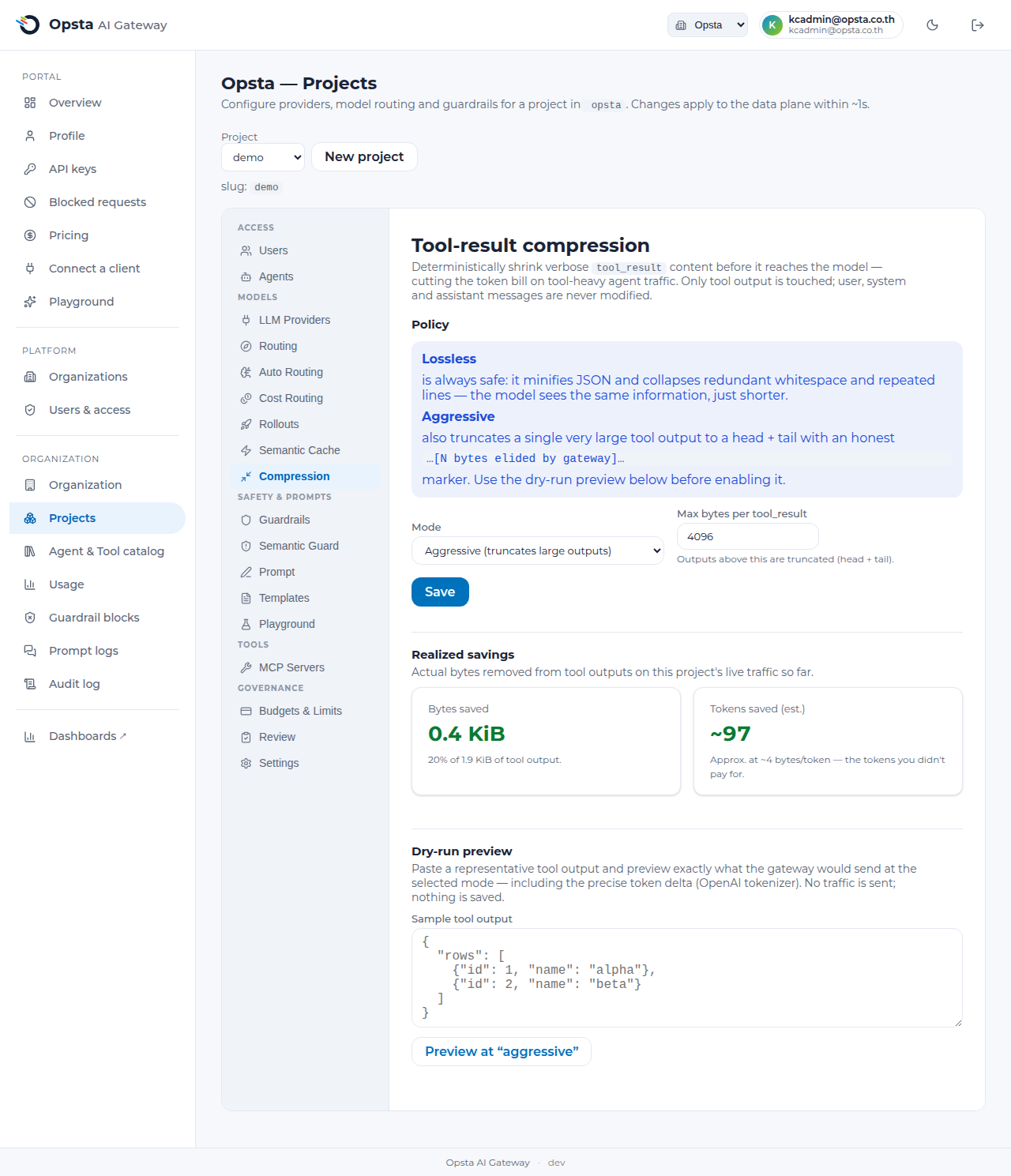
Tool-result compression deterministically shrinks verbose tool_result content before it reaches the model, cutting the token bill on tool-heavy agent traffic. Agents that call tools — searching code, querying APIs, reading files — get back large, whitespace-heavy JSON or logs, and every byte is re-sent on each turn. This compacts that output; the model sees the same information, just shorter.
Who can do this
Org admins (for their organization) and platform admins, on Projects → Compression. Default off per project — even the safe lossless mode is opt-in.
What it touches (and what it never touches)
Only the content of role:"tool" messages is rewritten. User, system, and assistant messages — and the message structure itself (tool_call_id, ordering) — are never modified. If anything about a request is unexpected, the gateway leaves it completely unchanged (fail-open): compression can never turn into an error or a dropped request.
Modes
- Off (default) — nothing is compressed.
- Lossless — always safe. Minifies JSON tool output (removes insignificant whitespace, preserves key order) and collapses redundant whitespace and repeated lines in text output. The model receives exactly the same information, in fewer tokens.
- Aggressive — everything lossless does, plus it truncates a single very large tool output to a head and tail, replacing the middle with an honest marker:
…[N bytes elided by gateway]…. Use this for tools that occasionally return huge dumps where the model only needs the start and end. Review the savings and the dry-run preview before enabling it.
Compression runs before the semantic cache, so the cache key is computed on the canonical compressed body — and the engine is deterministic, which keeps your provider's prompt-cache warm across turns.
Set it up
- Open Projects → Compression.
- Choose a mode — start with Lossless (safe everywhere).
- For Aggressive, set Max bytes per tool_result — outputs above this are truncated (head + tail).
- Save. The policy applies to the data plane within a second or two.
See the savings
- Realized savings shows the actual bytes and estimated tokens removed from this project's live traffic — so you can prove the win before widening the policy.
- Dry-run preview runs the exact gateway engine on a sample you paste and reports the precise token delta (using the OpenAI tokenizer). No request is sent and nothing is saved — it's a safe way to judge a mode, and especially to see how aggressive truncation would affect a representative tool output, before enabling it.
Notes
- v1 targets OpenAI-shaped tool messages (
role:"tool"with string content). - Compression is transparent to your users and clients — no request changes are required; see the user note.